 Reviewed by King Porn
12-year adult-site tester & Editor-in-Chief
Cross sales are optional add-on offers shown during sign-up that can result in additional memberships (and additional charges) on top of the site you intended to buy. They commonly appear at checkout—often right where you enter your payment details, and sometimes they’re pre-ticked so you’re opted in unless you notice and untick them.
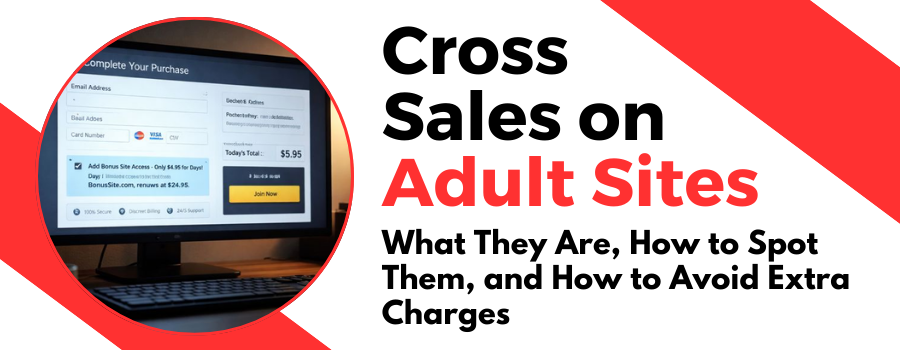
This page breaks down how cross sales work, why they catch people out, and exactly what to do if you’re not sure whether you agreed to one.
What “cross sales” means (in plain English)
A cross-sale is an offer to buy one or more extra products during checkout. In adult, that usually means:
- An extra porn site (or multiple sites)
- A “bundle” or “network” upgrade
- A discounted trial for a second brand
- A separate membership that renews on a different schedule
Sometimes the add-on is genuinely good value. The problem is presentation: cross sales can be easy to miss when you’re clicking fast, and they can be pre-selected so you’re opted in unless you untick them.
Where cross sales usually appear
Most cross sales show up in the final steps of checkout, such as:
- The payment details page (card entry / final confirmation step)
- A “one last step” screen right before you reach the confirmation page
- Inside the terms section or small print at the bottom of checkout
- An “upgrade your access” panel on the same page as the main price
If you see multiple product names, multiple prices, or extra checkboxes, assume you’re looking at an add-on decision point.
Why you should care
Cross sales matter because they can change what you’re actually paying for:
- Higher total cost than you expected
- Multiple renewals (sometimes on different dates)
- Different billing descriptors on your bank statement
- Multiple logins and separate cancellation steps
- More chances to forget something is active and renewing
If you only intended to buy one trial, a cross-sale can turn one small charge into two, three, or more.
How to spot a cross-sale in 10 seconds
Before you click “Join” or “Submit Payment”, scan the page for any of these signals:
- Extra checkboxes mentioning “special offer”, “bonus”, “add-on”, “partner”, “bundle”, “recommended”, or “upgrade”
- Pre-selected options (anything already ticked is something you need to actively review)
- More than one price or a “today you pay…” plus a second charge
- More than one renewal schedule (e.g., “renews every 30 days” plus “renews every 14 days”)
- Multiple product names listed in the same order summary
- Fine print that references a second product you didn’t come for
Quick rule
If you see more than one product name or more than one price, slow down and read it.
How cross sales actually work (what’s happening behind the scenes)
Cross sales are usually powered by the same billing flow that’s selling the main membership. During checkout, the system offers an additional product that can be added to your purchase with a checkbox click.
That extra product can be:
- Billed immediately (a second charge right now)
- Bundled into the “today” total (one combined amount)
- Added as a separate subscription that renews independently
- Included as a short trial that later turns into a higher renewal fee
This is why people get caught out: you can end up with an extra membership you didn’t intend, plus a renewal date you weren’t expecting.
Cross-sale vs bundle vs upsell: what’s the difference?
- Cross-sale: a different product offered alongside your main purchase (often a partner site or add-on).
- Bundle: multiple products sold together as a package (sometimes presented as an “upgrade”).
- Upsell: a higher tier of the same product (HD vs 4K, downloads, extended access, etc.).
They can look similar on checkout pages. The key is whether you’re adding a separate product/subscription.
Best practice: how to avoid cross sales completely
If you want to avoid accidental add-ons, use this routine every time:
- Pause on the payment screen. Don’t rush the final step.
- Hunt for checkboxes. Untick anything you didn’t ask for.
- Confirm the total. Make sure the “today” amount matches your expectation.
- Read renewal terms. Check what it renews at, and when.
- Screenshot the final checkout screen (price + what you’re buying).
- Save the confirmation email right after purchase.
That screenshot is the single best “receipt” you can have if you need support later, because it shows what was selected at the moment you paid.
“I’m not sure if I agreed to one” — what to do
If you’re unsure whether a cross-sale was added, do this in order:
1) Check your confirmation email(s)
Search your inbox for:
- The site name you joined
- “Welcome”, “Receipt”, “Invoice”, “Membership”, “Confirmation”
- Any billing company name shown at checkout
If you received more than one welcome/receipt email, that can indicate more than one product was activated.
2) Check the member area / account page
Log in and look for:
- “My Account”, “Billing”, “Subscriptions”, “Membership”, “Order History”
- Any “Active add-ons”, “Bundles”, or “Partner access” section
3) Check your bank statement for multiple charges
Look for:
- More than one charge on the same day
- Similar amounts but different merchant descriptors
- A second charge shortly after the first
4) If still unclear: contact billing support (not the studio)
In adult, payments are often handled by a billing processor. The processor can usually tell you exactly what’s active, what will renew, and how to cancel each item.
“I got charged and I didn’t expect it” — damage control steps
If you think a cross-sale caused an unwanted extra charge, handle it like this:
Step 1: Cancel first (stop future renewals)
- Cancel the extra add-on(s) as soon as possible.
- Take screenshots of the cancellation confirmation.
Step 2: Gather proof
- Confirmation emails
- Screenshots (if you have them)
- Bank statement line(s)
- Date/time you joined
Step 3: Ask billing support what the charge is for
Be direct. Here’s a message you can copy:
Hi, I signed up on [date/time]. I’m seeing an additional charge for [amount] that I didn’t expect. Please confirm what active subscriptions are on my account, what will renew and when, and cancel any add-ons I did not intend to purchase.
Step 4: If you still believe it was accidental, request a refund review
Some processors will review refund requests depending on timing and usage. Keep it factual and provide the details you collected.
Step 5: If you’re stuck, speak to your card provider
If you genuinely can’t resolve it through billing support, your card provider can explain dispute options and next steps. This isn’t legal advice—just the practical escalation route if you hit a wall.
Common myths (that cause people to get burned)
- “It’s one login, so it’s one subscription.” Not always. Bundles and add-ons can still be separate billing items.
- “If it was on the page, it must be obvious.” Checkout design can hide important details, and pre-ticked boxes do exist.
- “Canceling the main site cancels everything.” Often false. Add-ons may have separate cancellation steps.
Frequently Asked Questions
What are cross-sales during adult site checkout?
Cross-sales are optional add-ons offered during sign-up (often on the payment page) that can activate an extra membership or trial alongside the one you intended to buy. If accepted, they can create additional charges and separate renewals.
Why was I charged twice after signing up for a trial?
Two charges usually means one of two things: you added an extra offer at checkout (a cross-sale), or the sign-up included more than one product/subscription. Check your emails for multiple receipts and your bank statement for separate descriptors and amounts.
How can I tell if I accidentally agreed to a cross-sale?
Look for multiple confirmation emails, more than one active subscription in your account area, or multiple charges on the same day. If you see more than one product name, price, or renewal date in your receipt/history, a cross-sale was likely added.
Are pre-ticked boxes at checkout a sign of a cross-sale?
Often, yes. Some checkout pages show add-ons with checkboxes that can be pre-selected. If you see a pre-ticked option for a “bonus”, “bundle”, “partner”, or “upgrade”, review it carefully and untick anything you don’t want before paying.
Why does the charge name on my bank statement look unfamiliar?
Many adult sites bill through third-party payment processors, so the statement name (billing descriptor) may differ from the brand you joined. Search your inbox for receipts that match the date/amount and look for the processor name in the email.
How do I cancel a cross-sale or add-on membership?
Cancel it where the subscription is managed—either in your account billing/subscriptions page or via the payment processor’s support portal. Don’t assume canceling the main membership cancels add-ons; cross-sales can renew separately and may need separate cancellation steps.
What should I do if I don’t know which site the extra charge is for?
Start with your email: search for the charge amount, the join date, and keywords like “receipt”, “invoice”, “membership”, or “welcome”. If you still can’t identify it, contact the payment processor using the descriptor and date—ask them to list all active subscriptions and renewal dates tied to your card.
Can cross-sales renew on a different date than my main subscription?
Yes. A cross-sale can be a separate subscription with its own billing cycle. That’s why people get surprise renewals—your main plan might renew monthly while an add-on renews on a different schedule.
Can I get a refund if I didn’t mean to add a cross-sale?
Sometimes. First, cancel immediately to stop future renewals. Then contact support with the join date/time, charge amount, and any receipt details and request a refund review for the unintended add-on. Outcomes vary by processor, timing, and usage, so be factual and provide proof.
How can I avoid cross-sales and surprise charges in the future?
Slow down on the payment page, untick anything extra, confirm the exact total you’re paying today, and read the renewal terms. Take a screenshot of the final checkout screen and keep the confirmation email—those two things make it much easier to fix issues fast.
Bottom line
Cross sales aren’t automatically “bad”, but they’re easy to accept by accident if you rush checkout. Take 10 seconds to scan for extra checkboxes, confirm the final total, and keep proof of what you agreed to.
Popular Porn Trials
-

Brazzers $1 Trial
2 Days / $1Iconic high-budget hardcore productions -
BangBros $1 Trial
2 Days / $1Legendary Miami-style gonzo porn -
Reality Kings $1 Trial
2 Days / $1Wild variety of premium porn scenes -
Digital Playground Trial
2 days / $1Big-budget porn with cinematic plots -
Adult Time Trial
3 Days / $1One pass, full network access -
DFXtra Trial
3 Days / $2.95Huge 4K interracial library -
Evil Angel Trial
3 Days / $2.95Anal, fetish, and gonzo from legends -
Diabolic Trial
3 Days / $2.95Hardcore gonzo studio archive, mixed eras